Looking for a gaming chair that combines comfort, style, and reliable support? Clutch gaming chairs are designed for gamers who spend long hours playing, streaming, or working at their desks. With features such as ergonomic support, adjustable components, and gamer-focused designs, they can help create a more comfortable setup. In this guide on chairfloor.com, we’ll explore Clutch gaming chairs, their key features, benefits, and what to consider before choosing one for your gaming setup.
What Are Clutch Gaming Chairs?
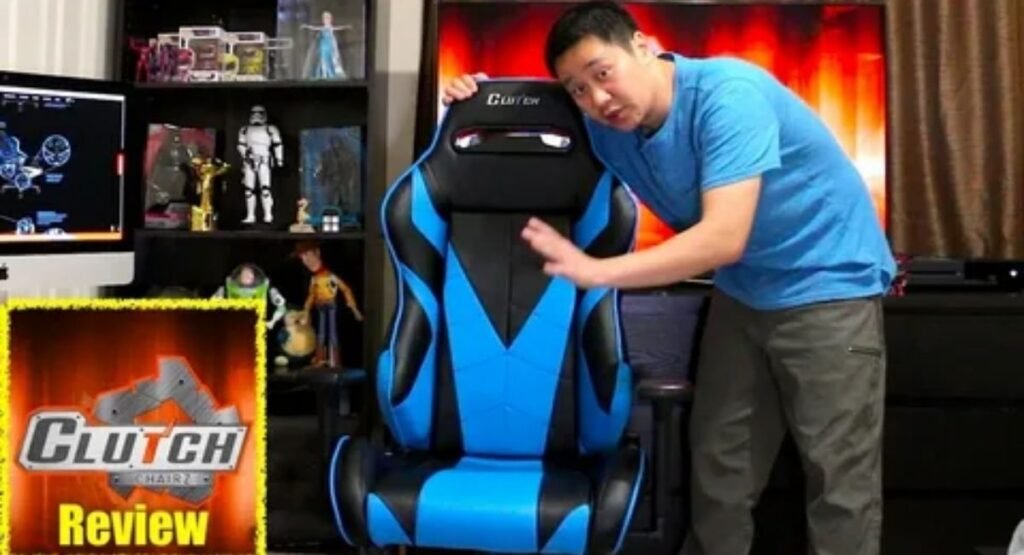
Clutch Chairz has built its reputation around large, performance-oriented seating designed for demanding computer use. The Throttle Series is especially notable because it uses a tubular steel frame, high-density foam, PU leather upholstery, a heavy-duty aluminum base, and a Class 4 gas lift. Historical specifications listed a 330-pound maximum capacity, although buyers should verify the current model’s specifications before ordering. ([PC Perspective][1])
The design sits firmly in the racing-style gaming chair category, but its proportions distinguish it from many narrow bucket-style seats. Earlier reviews measured the Throttle at roughly 21.6 inches wide and 22.5 inches deep, making seat dimensions a particularly important consideration. ([ChairsFX][3]) For someone who dislikes restrictive side bolsters, that broader design can feel substantially more natural.
Why Choose a Clutch Gaming Chairs?
The strongest reason to consider Clutch is its emphasis on substantial construction and generous seating. A premium gaming chair makes more sense when you regularly spend long periods at your desk and value durable materials, substantial cushioning, and extensive adjustment. Historical Throttle testing praised its wider seat, structural strength, comfort, and warranty coverage. ([PC Perspective][4])
Still, buying the biggest chair available can create problems. A shorter user may find an oversized seat difficult to position correctly, while a narrow desk may leave insufficient room for broad armrests. Think of chair selection like buying shoes: extra space is not automatically better. The goal is a comfortable gaming chair that supports your body without forcing you to reach, slouch, or perch forward.
Clutch Gaming Chairs: Key Features to Consider
A good chair should solve practical problems rather than simply display an impressive specification sheet. The most important features include frame construction, seat dimensions, lumbar support, armrest movement, cushioning, recline, and upholstery. These characteristics determine whether a gaming chair for long hours remains useful after the novelty of the first week disappears.
The Throttle’s historical specifications provide a useful example. They included a tubular steel frame, high-density cold-cured foam, 4D armrests, a Class 4 gas lift, non-marking casters, lumbar and headrest cushions, and substantial reclining capability. ([PC Perspective][1]) That combination creates a supportive gaming chair, but the specifications still need to match your individual dimensions.
| Feature | What to Look For | Why It Matters |
|---|---|---|
| Frame | Tubular or reinforced steel | Structural strength |
| Seat | Appropriate width and depth | Better body fit |
| Lumbar support | Adjustable or well-positioned | Lower-back support |
| Armrests | Multiple adjustment directions | Better desk alignment |
| Foam | High-density, resilient cushioning | Long-term comfort |
| Recline | Multiple locking positions | Posture variation |
| Upholstery | Fabric or quality leatherette | Comfort and maintenance |
| Base | Wide, sturdy five-point base | Stability and movement |
Frame and Base
A stable gaming chair starts with a solid foundation. Historical Throttle specifications included a tubular steel frame and forged aluminum base, while the gas lift carried a stated 330-pound capacity. ([PC Perspective][1]) The practical lesson is simple: examine the entire load-bearing system rather than judging durability from the upholstery alone.
Lumbar Support
A useful gaming chair lumbar support should meet the natural curve of your lower back without pushing your torso unnaturally forward. OSHA recommends a backrest that follows the spine’s natural curvature and provides suitable lumbar support. ([OSHA][5]) Cushion placement matters because poorly positioned support can become another source of pressure.
Armrests
4D armrests offer movement in several directions, giving you more control over elbow and forearm positioning. The Throttle’s historical specifications describe adjustment up and down, forward and backward, side to side, and rotational movement. ([PC Perspective][1]) Good adjustable armrests should support your lower arms while keeping your shoulders relaxed.
Seat and Foam
Seat dimensions often matter more than dramatic marketing claims. Check the gaming chair seat width, seat depth, and usable seating area against your own body measurements. OSHA recommends a seat wide enough for the user’s thighs and stresses that excessive or insufficient depth can interfere with proper back support. ([OSHA][2])
The Throttle historically used high-density foam designed to provide substantial cushioning. ([PC Perspective][1]) A memory foam gaming chair can feel plush and conforming, but softness alone does not determine comfort. Your preferred seat firmness depends on body weight, sitting position, and how many hours you spend seated.
Upholstery and Recline
A leatherette gaming chair can offer a polished appearance and relatively straightforward cleaning, while a fabric gaming chair may feel more comfortable in warm rooms. Look beyond appearance and consider breathable upholstery, because prolonged contact with less breathable materials can increase heat buildup during summer gaming sessions.
A gaming chair with reclining backrest provides useful flexibility when you want to change positions. Historical Throttle specifications reported extensive backrest adjustment and tilt functionality. ([PC Perspective][1]) However, reclining should complement an upright workstation position rather than encourage you to work continuously in a deeply reclined posture.
Are Clutch Gaming Chairs Comfortable for Long Hours?
Comfort becomes meaningful only after several hours, not during a five-minute showroom test. A gaming chair with built-in lumbar support can help maintain a stable sitting position when properly adjusted. The objective is a consistent gaming posture, where your back remains supported and your shoulders do not gradually creep upward.
Good proper lumbar support should contact the lower-back curve while allowing a natural spine position. Meanwhile, an upright sitting position should feel supported rather than rigid. OSHA recommends adjustable backrests and lumbar support that fits the lower back, reinforcing the importance of adjustability instead of relying on fixed cushioning alone. ([OSHA][5])
Long sessions also expose small fit problems that short tests hide. A gaming chair with neck support can feel useful when the headrest fits your height, while poorly positioned padding may push your head forward. Likewise, neck and head support should complement the backrest instead of forcing your body into an artificial posture.
Your chair should also provide adjustable support around your arms and torso while maintaining a comfortable seating position. During long gaming sessions, you should aim to reduce fatigue and reduce discomfort, especially around the back and shoulders. If you develop persistent shoulder tension, check your armrest and desk height before blaming the chair.
Clutch Gaming Chairs for Different Types of Gamers
The best chair depends heavily on how you actually use your computer. A gaming chair for competitive gaming should provide dependable support without interfering with rapid movements. For example, a player using low mouse sensitivity may need generous forearm support, while someone with a compact desk may prefer narrower armrests.
For FPS players, a gaming chair for FPS gaming should provide stable positioning rather than promise faster reactions. Good mouse-side comfort can make long aiming sessions easier, while properly positioned armrests can help maintain relaxed shoulders. The chair cannot improve mechanical skill, but it can remove distractions caused by discomfort.
For streamers and remote workers, a gaming chair for work and gaming needs broader versatility. A creator may spend six hours editing footage before playing a match, while another user may alternate between spreadsheets and gaming throughout the day. In both cases, proper desk alignment matters as much as the chair itself.
Your monitor, keyboard, and chair should function as one system. Start with monitor alignment, then adjust the keyboard and mouse setup so your arms remain comfortable. OSHA similarly recommends adjusting the chair alongside the monitor, keyboard, and desk rather than treating seating as an isolated component. ([OSHA][5])
Clutch Gaming Chairs vs Office and Ergonomic Chairs
A gaming chair is not automatically more ergonomic than an office chair. A well-designed ergonomic gaming chair can combine substantial cushioning, recline, and gaming aesthetics with useful adjustability. However, premium office seating often offers more sophisticated seat-depth adjustment, mesh ventilation, and posture-focused mechanisms.
The difference becomes clearer when comparing actual gaming chair ergonomics. Office chairs frequently prioritize neutral ergonomic seating for extended work, while racing-style chairs often emphasize appearance, side bolsters, reclining, and a taller backrest. Your best choice depends on whether gaming performance, office productivity, ventilation, or adjustability receives the highest priority.
| Factor | Clutch Gaming Chair | Ergonomic Office Chair | Mesh Office Chair |
|---|---|---|---|
| Gaming aesthetics | Excellent | Low | Low |
| Reclining | Usually strong | Varies | Varies |
| Seat cushioning | Usually substantial | Moderate to substantial | Moderate |
| Breathability | Depends on upholstery | Usually good | Excellent |
| Armrest adjustment | Strong on premium models | Often excellent | Often excellent |
| Gaming suitability | Excellent | Good | Good |
| Office appearance | Moderate | Excellent | Excellent |
| Large-seat options | Available | Varies | Varies |
A major advantage of office seating can be its emphasis on posture support and adjustability. OSHA notes that seat depth should support the thigh without pressing behind the knees, while armrests should support the forearms and allow the shoulders to remain relaxed. ([OSHA][2]) These principles apply equally to gamers.
In contrast, a gaming chair may provide features that office chairs do not emphasize, including deeper recline, pronounced side bolsters, and gaming-oriented styling. If you stream regularly, appearance may have practical value. If you work eight hours daily in a warm room, however, a breathable ergonomic office chair may offer better overall value.
Pros and Cons of Clutch Gaming Chairs
The biggest strength of Clutch gaming chairs is their combination of substantial construction and generous seating. Historical reviews highlighted the Throttle’s wider seat, high-density foam, steel frame, 4D armrests, reclining capability, and warranty. ([PC Perspective][4]) Those characteristics make the brand particularly interesting for users who dislike cramped bucket-style seats.
The main drawback is fit complexity. A large chair can feel luxurious for one person and awkward for another. A durable gaming chair also occupies meaningful floor space, while leatherette can become warm in hot conditions. Older Throttle reviews specifically identified price as its major weakness. ([PC Perspective][4]) Therefore, premium construction should justify the purchase only when you actually benefit from it.
Common Mistakes
One frequent mistake involves confusing specifications with comfort. A high gaming chair weight capacity does not tell you whether the seat depth suits your thighs. Likewise, buying the largest available model without checking measurements can place the armrests too far apart or prevent proper lumbar contact.
Another mistake is ignoring the desk. A chair may have excellent adjustable armrests, yet those armrests can become useless if they collide with the desktop. OSHA specifically recommends ensuring that armrests do not interfere with workstation positioning and that they support the lower arms while keeping the shoulders relaxed. ([OSHA][5])
How to Choose the Right Clutch Gaming Chair
Start with body measurements instead of color or branding. Measure your height, approximate hip width, and leg length, then compare those numbers with the manufacturer’s current specifications. Historical Throttle guidance placed the chair around medium-to-large users, while newer listings can differ by model and revision. ([ChairsFX][3])
Next, evaluate chair height adjustment and seat depth. Your feet should rest securely on the floor or an appropriate footrest, while your back should contact the backrest without forcing your knees against the seat edge. OSHA specifically warns that incorrect seat dimensions can create discomfort and interfere with proper support. ([OSHA][5])
Your preferred sitting style should determine the next features. If you alternate between intense matches and relaxed viewing, prioritize reclining positions and a backrest that locks securely. If you work at the same desk, prioritize armrest compatibility and desk clearance. A chair should adapt to your routine instead of forcing your routine around the chair.
Before purchasing, test the complete gaming chair adjustment sequence if possible. Set the height, lumbar position, armrests, recline, and desk relationship. Then evaluate whether you can maintain a proper sitting position without consciously holding yourself there. OSHA recommends trying chairs for comfort and fit over an extended period before purchase whenever possible. ([OSHA][2])
A Practical Buying Checklist
A useful purchase test should cover fit, movement, materials, and maintenance rather than aesthetics alone. Check the frame, base, seat width, depth, lumbar placement, armrest range, recline mechanism, casters, warranty, and return terms. These details reveal much more about long-term value than a promotional phrase such as “ultra comfort.”
Finally, consider your room. A breathable gaming chair may be preferable in a warm bedroom, while leatherette can suit users who prioritize easy cleaning. Think about carpet, hardwood, desk clearance, and available floor space. These seemingly minor factors often determine whether an expensive chair becomes a daily pleasure or an oversized obstacle.
Clutch Gaming Chairs vs Alternatives: Which Should You Buy?
Clutch deserves comparison with other premium categories before you spend several hundred dollars. A high-quality gaming chair may suit someone who wants aggressive styling and substantial cushioning, while a premium ergonomic office chair can better suit someone who spends most of the day working. Budget racing chairs may also provide similar aesthetics for substantially less money.
The right alternative depends on priorities rather than brand loyalty. For example, a competitive player may value stability and armrest positioning, while a remote worker may prioritize ventilation and fine-grained seat adjustment. A larger user might prefer Clutch’s broader proportions, while a smaller user could benefit from a more compact chair with adjustable depth.
| Buyer Priority | Better Direction |
|---|---|
| Large seating area | Clutch or large-format gaming chair |
| Competitive gaming | Stable gaming-focused design |
| Eight-hour office work | Ergonomic office chair |
| Hot environment | Breathable mesh or fabric |
| Strong gaming aesthetics | Clutch or racing-style chair |
| Tight budget | Midrange gaming chair |
| Maximum ergonomic adjustment | Premium office chair |
| Gaming plus streaming | Premium gaming chair |
For comparison, gaming chair stability can matter more during competitive play, while office seating may offer greater flexibility for mixed work tasks. Look specifically at frame stability, wheelbase stability, armrest range, and recline. Do not assume a higher price automatically means better engineering.
Also consider long-term comfort and maintenance. A chair that feels exceptional on day one but becomes hot, cramped, or difficult to clean may not be the best investment. Your gaming setup should support your actual routine, whether that means ranked matches, streaming, schoolwork, or a combination of all three.
Are Clutch Gaming Chairs Worth It? Final Verdict
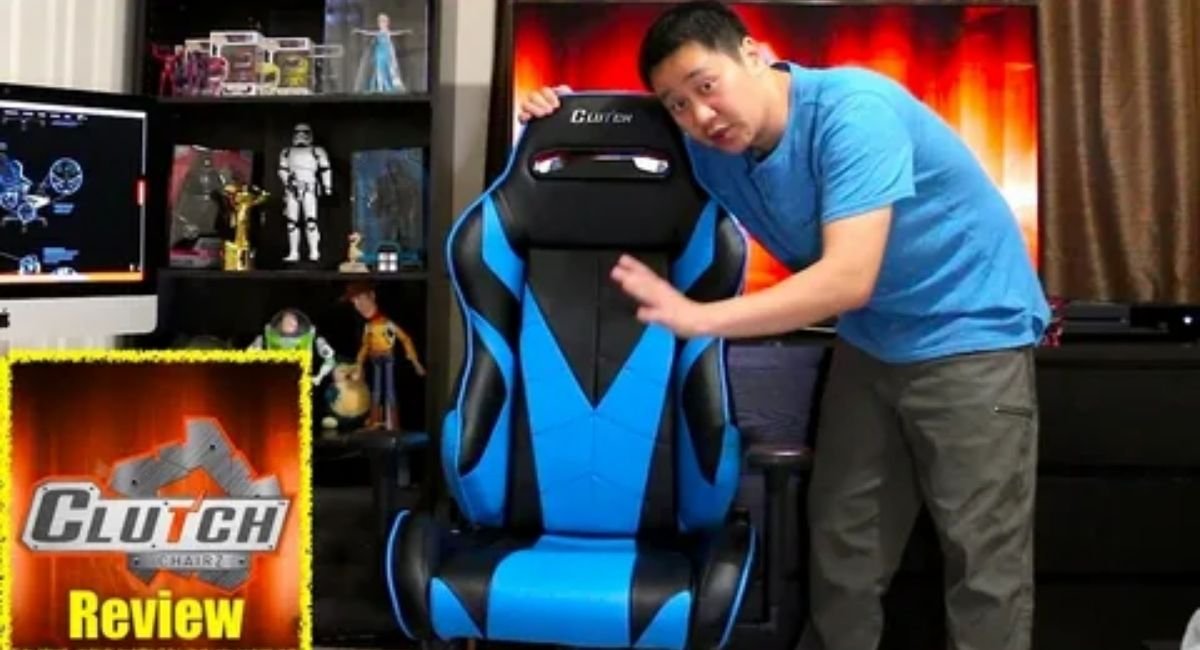
So, are Clutch gaming chairs worth buying? For users who want a substantial racing-style design, broad seating, strong construction, extensive adjustment, and long-session cushioning, they can make a compelling case. Historical Throttle testing found strong comfort and construction, while its documented specifications show why the chair attracted larger-format gaming enthusiasts. ([PC Perspective][1])
However, the answer changes when your priorities change. If you need advanced office ergonomics, maximum breathability, a compact footprint, or a highly adjustable mesh seat, another category may suit you better. The best chair is ultimately the one that fits your body, desk, environment, and daily routine—not necessarily the one with the longest feature list.
The most important decision comes down to fit. Check the seat dimensions, height range, weight rating, lumbar placement, armrest range, upholstery, and warranty before purchasing. If possible, test the chair for an extended period. That approach aligns with OSHA’s guidance to evaluate comfort and fit before committing to a workstation chair. ([OSHA][2])
Computer Workstations – Workstation Components – Chairs | Occupational Safety and Health Administration”
Meta discription
Discover the best Clutch gaming chairs for comfort, ergonomic support, durability, and long gaming sessions. Find the right chair for your gaming setup.
